Meters, Test Kits, Inspection Supplies & Tools!
 Discontinued
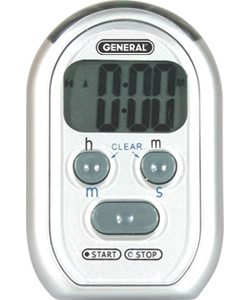
Timer Up & Down 0-20 Hour (Ti150) Audible & Visual Alarm
Reference only — not for sale
| Model | Ti150 |
|---|---|
| Manufacturer | General Tools |
| Category | Timers / Clocks |
| Status | Discontinued |
Product details (archived)
The information below is retained for reference only. This item is discontinued and cannot be ordered.
Features:
- Choose hours/minutes (h/m) or minutes/seconds (m/s) mode by sliding the bottom right switch.
- Switchable 20hr/20min resolution
- Ideal for the Visually & Hearing impaired
- Timer & Stopwatch
- Displays: hours, minutes & seconds
- Split & Lap functions
- Automatically counts-up after reaching zero
- Memory function
- Extra loud alarm
- Large display
- Count up / Count down
Specifications:
- 0 to 20 hour time range
- Display size: 1.4" x 0.6"
- Unit size: 2.67" x 2.67" x 0.4"
- Power source: (2) AAA batteries
- Weight: 2 oz
Supplied With:
- 2 alkaline AAA batteries
- Spring clip
- Stand + Magnet
Instructions:
To set the Count Down Timer:
On the rear of the timer:
1. Choose hours/minutes (h/m) or minutes/seconds (m/s) mode by sliding the
bottom right switch.
2. Select Beep (add symbol), Flash (add symbol), and/or Vibrate (add symbol), by
sliding the appropriate switches
On the front of the timer:
3. Set the time by pressing h/m and/or m/s
Note: If you selected m/s on the back in step #2 then the h/m button on the
front sets the minutes and the m/s button sets the seconds. If you selected the
h/m on the back in step #2 then the h/m button on the front sets the hours and
the m/s button sets the minutes.
4. Press START/STOP button to begin count down
5. To stop the count down, press START/STOP again
6. To clear display, press both h/m and m/s buttons simultaneously
To set the Count up timer (Stop Watch):
On the rear of the timer:
1. Choose hours/minutes (h/m) or minutes/seconds (m/s) mode by sliding the
bottom right switch.
2. Select Beep (add symbol), Flash (add symbol), and/or Vibrate (add symbol), by
sliding the appropriate switches
On the front of the timer:
3. Press START/STOP button to begin count down
4. To stop the count down, press START/STOP again
5. To clear display, press both h/m and m/s buttons simultaneously